
Job-order ERP · engineer-to-order

Everything comes back to the job

Know what you are earning on every job now, not after final acceptance. Quadra is the ERP for companies that design, build, commission and service special machines: every hour, every order and every euro stays tied to its job.
Web + PWABuilt-in AIISO 9001EU Reg. 2023/1230RENTRIGDPRMCP server
Overview › Dashboardlive data
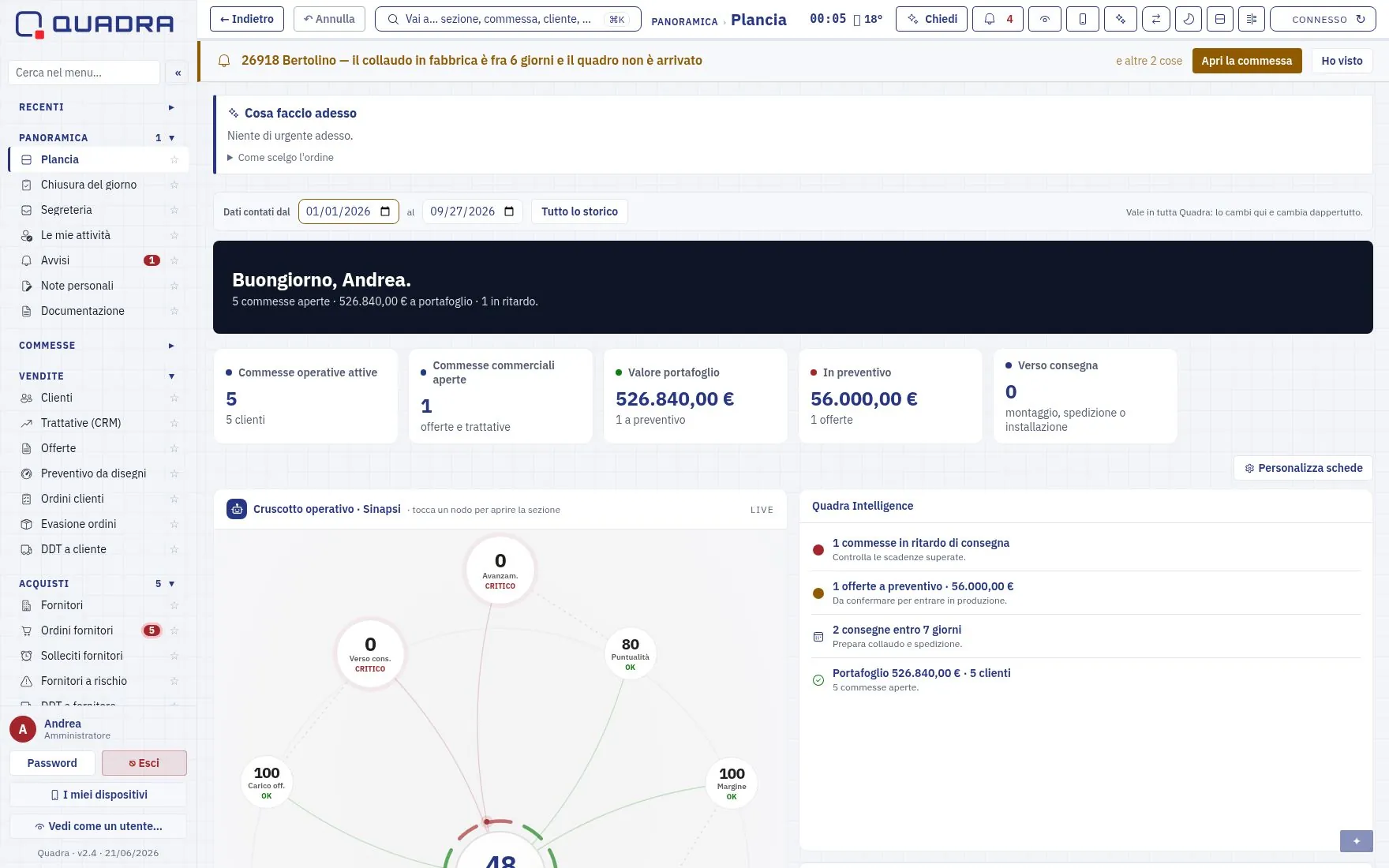
The Quadra Dashboard: active jobs, order backlog value, operations gauge and deadlines

26918 Bertolino Impianti
Factory acceptance test in 6 days: the electrical cabinet has not arrived yet.

Job 26918margin OK
Robotic welding cell
Value€184,000 Costs to date€97,450 Estimate at completion€151,200 Expected margin17.8%
progress 53%delivery 14/11
Payables agentsuggestion
Invoice 2026/318 · Meccanica Valsusa · €4,860 → job 26918, due 30/11.
ApproveCorrect
Clock-in · M. Ferrero · at the company Customer order imported from PDF · job 26921 FAT result: failed · NC 2026-044 opened SdI invoice 2026/318 matched to order 1184 Delivery note (DDT) 1191 issued · Nordovest Automazione Meeting minutes dictated · 3 tasks created after confirmation Estimate at completion over budget · job 26909 Pre-delivery checklist signed · 26914
80

working screens in 15 areas

18

tabs inside every job

26

working screens on the phone

€0

license fee per user

From first contact to after-sales

One thread, no re-keying

Data is entered once and travels with the job. The quote becomes an order, the order becomes a bill of materials and purchases, testing closes the non-conformities, and delivery opens the machine portal.

1

Deal

CRM with weighted pipeline and win probability

2

Quote

Calculator with component catalog and margin

3

Job

Gantt, workloads, BOM from CAD, orders

4

Testing

FAT/SAT; failed checks open non-conformities

5

Delivery

Signed checklist, delivery note, invoice, CE technical file

6

After-sales

Machine portal with QR, service calls, spare parts

Try Quadra for free

Explore Quadra on your own, for 7 days

Leave your name, company and email and get your personal link straight away. You step into a sample company and see jobs the way you will: costs to date, estimate at completion, margin job by job, quotes and CRM, management control. You also see the pages Quadra sends to your customers. The trial pages are in Italian.

No installation, no card. We also send you the link by email. Privacy.

1
Jobs and margins

Six jobs with value, costs, estimate at completion and expected margin. Two need rescuing.

2
Job economics

Budget versus actuals line by line, and a what-if: what happens to the margin if assembly overruns.

3
Quotes and management

Weighted pipeline, quote calculator, forecast revenue and costs, margin alerts.

4
The customer side

Machine portal via QR code, minutes to approve, job progress.

The platform

Big-company methods, on real company data

Management control

See the margin as it happens

Actual costs and estimate at completion (EAC), job by job. When the estimate goes over budget, Quadra flags it before the job starts losing money.

0 60k 120k budget 165k MayJunJulAugSepOctNovDec EAC 151.2k today 97.5k
actual costsestimate at completionbudget
EU Machinery Regulation

2023/1230 applies from 20 January 2027

Declaration in the new format, digital manual online for at least 10 years, safety software retained. Already in Quadra.

116days

Your customer gets their own page

Every delivered machine has a portal with a QR code: manual, declaration of conformity, service and spare parts. Every request opens a task in Quadra.

Open to agents

Native MCP server

Jobs, KPIs and deadlines exposed read-only to external AI agents, with a revocable token.

quadra.commesse(stato="aperta") → 5 jobs · €526,840
Integrations

Connected to what you already have

SdI and open banking, compliant digital archiving, RENTRI, ECB rates in 31 currencies, VoIP phone system, cameras, digital signature.

Artificial intelligence

Agents inside the workflows, always with your approval

A commercial ERP sells its copilot for €2,100 per user per year. In Quadra the agents are part of the work. They suggest, and a person confirms: nothing saves itself.

  • PayablesClassifies SdI invoices, matches them to orders, suggests due dates.
  • Customer orders from PDFReads the header and lines, files the document in the job.
  • Spoken minutesDictated on the phone; action items become tasks after confirmation.
  • Ask the systemQuestions in plain language, answers and charts on real data, read-only.
  • Quote win probabilityBased on the won/lost history of similar jobs.
  • GovernanceMoney fields are removed before the model sees them.
Try asking

Two. Job 26909 has an expected margin of 4.1%: the estimate at completion is €6,200 over budget. Job 26921 is at 9.8%, with assembly hours 18% over plan.

Example with demo data
Mobile

Your company in your pocket, for real

26 working screens on the phone, the same app for the whole company. Designed for people who work in gloves, under a machine or on a customer site.

GPS clock-in

You can only clock in within the site radius. The check runs on the server: outside the radius, or with location denied, the clock-in does not go through. People travelling for work choose “Off site”.

Clocking out asks for the hours

At the end of the day, clock-out unlocks only once the hours are assigned to jobs. Labor cost reaches the job the same day.

Works without signal too

At the company or on a site with no network, hours wait in a queue on the phone and send themselves when the network is back.

Photograph a document

Delivery notes, maintenance reports, certificates: take a photo, and the PDF lands in the right job.

Dictate the minutes

You record the meeting, the AI transcribes it and suggests action items with owner and due date. They become real tasks after you confirm.

Checklist signed with a finger

Pre-delivery testing under the machine: big OK and KO buttons, signature on the screen. Without a signed checklist the job cannot move to Delivery.

Business trips without paperwork

Quadra spots the trip in the calendar, prepares the customer documents beforehand, and afterwards gives you the expense report already filled in.

Expense report in a minute

Photo of the receipt, amount and job. The daily allowance is calculated automatically, and a meal receipt reduces it by a third. The manager approves from the phone.

Trips tracked by GPS

The tracker in the vehicle records every trip. Quadra compares it with the calendar appointments, links the kilometers to the task and adds them to the expense report: mileage refund for your own car, business kilometers for the company vehicle. Confirm with one tap.

Ask the system

“How many hours do we have on 26918?” Questions in plain language, spoken too, with answers from real data.

Cameras

The company video surveillance, on the phone of the person responsible for it.

A real app, no app store

Installs from the browser: push notifications, the Android Back button, quick approvals of leave, orders and clock-ins.

Meetings

You record the meeting, Quadra writes the minutes

Put the phone on the table and press a button. When the meeting ends you have the transcript, the summary, the decisions and the action items with owner and due date.

Vehicle GPS

Vehicles on the map, trips on the job

A GPS tracker in the OBD port, and Quadra receives the position directly, with no external service to pay for per vehicle.

  • Where they are now: position, speed and stops of every vehicle, updated within seconds.
  • Trips already assigned: each trip is linked to the business trip and the job, so the travel cost goes where it belongs.
  • From calendar to expense report: Quadra compares the vehicle's trips with the calendar appointments, links the kilometers to the task and prepares the expense report. A person confirms, and the refund is done.
  • Time-limited location sharing: a link with an expiry date so the customer can follow the vehicle's arrival, revocable whenever you want.
  • Alerts: a vehicle moving outside working hours, or a tracker that stops connecting.
Phone system

Know who is calling before you answer

Quadra connects to the company phone system (FreePBX and Asterisk). The phone rings and the customer is already on screen, with their open jobs.

  • Who is calling, instantly: when the phone rings, Quadra opens the customer record: city, contacts and jobs in progress. You know what the call is about before you pick up.
  • The name on the phone display: the phone system asks Quadra who owns the number: customers, suppliers and colleagues show up by name, even on desk phones.
  • Click to call: from a number in the address book or in a job: your extension rings and the call starts, nothing to dial.
  • Call log: incoming, outgoing and missed calls, linked to the address book. Everyone has their own extension.
Finance and treasury

Accounts, due dates and transfers in one place

Quadra connects to your banks through open banking: it sees the balances and transactions of every account and initiates transfers. You authorize every payment at your bank, with your own credentials.

  • All accounts on one screen: balances and transactions update on their own, with no statements to download.
  • Transactions match to documents: each receipt finds its invoice, each transfer its supplier.
  • Pay from the due list: select the supplier invoices falling due and issue SEPA transfers from Quadra. No amount leaves without your confirmation at the bank (SCA).
  • Internal accounting: double-entry journal, monthly income statement and balance sheet. Tax returns and payslips stay with your professional advisers.
Inside the app

Real screens, real data

Only the customer names have been changed.

Overview › Dashboard
Overview

Dashboard

The opening screen: order backlog value, active jobs, upcoming deadlines, and a gauge that sums up the company's operational health in one number.

What it does

80 screens, 15 areas

Quadra generates this list itself by reading its own menu, so it can never be older than the software. Open the area you are interested in.

01Overview5 screens

Where you start in the morning: what happened, what is waiting for an answer, what is due.

DashboardThe opening screen: the few things that matter today, at a glance
End of dayClosing the day: hours, clock-ins and open items
Front officeDaily summary and quick access to administrative work
Personal notesQuick private notes: only you can see them, on the phone too
DocumentationCompany, safety, operator, plant and vehicle documents, with due dates
02Jobs8 screens

The heart of Quadra. Everything (hours, costs, orders, documents, progress) is tied to a job, and you read it from there.

JobsThe working list of open jobs, with status, value and owner
Job boardAll jobs at a glance: value, margin, deadlines
ProgressWhere each job stands, phase by phase
Resource loadWho is busy and who is free in the coming weeks, by person and by job
Workload plannerReal net capacity (after leave and time off) against job workload, by person and week
RiskJobs that need attention: delays, margins, critical issues
Meeting minutesMeeting minutes, written or dictated
Design / process / cyber FMEAFailure mode analysis with S·O·D, RPN and action priority
03Sales7 screens

From first contact to order: customers, quotes, confirmations and deliveries, with documents generated from the data, not from a template you fill in.

CustomersCustomer records with documents and terms
Deals (CRM)Opportunities before the quote: who asked for what, what it is worth and what the next step is. Dated actions go into the Deadline tracker
QuotesCustomer quotes: status, values and conversion into a job
Quote calculatorPrice a complete quote (tooling, hours, markups, margin → price) and link it to a job whenever you want
Customer ordersAll customer orders, imported from PDF or entered by hand
Order fulfillmentCustomer and supplier orders with status, lines and documents
Delivery notes (DDT)Delivery notes issued
04Purchasing2 screens

Suppliers, orders and receipts. Orders carry the cost to the job: this is where management control gets its numbers.

SuppliersSupplier records with ratings and terms
Supplier delivery notesDelivery notes received from suppliers
05Warehouse and items1 screen

What you have, where it is, and what it is worth. Including the catalogs of components we resell.

ItemsThe catalog of items and components, with stock levels and price lists
06Production and MES1 screen

The machines and what happens on them.

MachineryThe company's own equipment, with documents and inspections
07Welding cells2 screens

The area for standard cells and the in-house welding gun.

Welding GunThe in-house welding gun: technical data and applications
Standard cellsStandard welding cells: configuration and documentation
08After-sales service3 screens

The installed base and maintenance, both ours and our customers'.

Customer installed baseMachines installed at customer sites: data, documents and service history
Maintenance dueScheduled maintenance on the installed base that is coming up or overdue
MaintenanceThe log of internal maintenance on machines and equipment
09Administration and finance9 screens

Receivables and payables, bank, cash and accounting. Invoices come in from SdI and categorize themselves when a rule says so.

Income statementThe company's income statement month by month, built from transaction categories
Invoices received (SdI)Payables: supplier invoices, automatic classification and payments
Non-SdI invoicesInvoices that do not go through SdI (foreign invoices and self-invoices), with their register
PECCertified emails (PEC) received and sent, archived and linked to documents
SALProgress statements (SAL) and milestone billing
Banks and accountsCompany bank accounts and their details
RemindersSupplier orders that are late. The email draft is written by AI and is always reviewed before sending
AccountingDouble-entry journal, trial balance, income statement and balance sheet: the internal accounting picture. Tax returns and tax registers stay with your accountant
PaymentsSEPA transfers through open banking (PISP). Every payment order must be authorized at the bank with your own credentials (SCA): no amount is charged without confirmation
10Management control2 screens

What a job really costs and how much is left. With the estimate at completion, not just actuals.

Job controlLive financial picture, job by job: orders, hours, revenue, margin and estimate at completion
Management controlThe management dashboard: Earned Value, 12-month rolling forecast, bottleneck margin, anomalies and collections position
11People15 screens

Your people: attendance, hours, leave, payslips, training, skills.

Employee recordsUsers and access, with each employee's personal documents
AttendanceEmployee clock-ins, clock-outs and hours, with alerts for missed clock-ins
Hours workedHours logged on jobs, by operator and by period
Expense reportsEmployee expenses: approval and refund, with a photo of the receipt
WelfareEmployee benefits: welfare budget, fringe benefit exemption thresholds and export for the payroll consultant
IncentivesFormula-based team bonus on measurable targets (gainsharing), payable as welfare benefits too
PayslipsDistributing payslips to employees
PayrollCompany labor cost month by month (gross pay + contributions + severance). Payslip processing stays with the payroll consultant: this is where the financial picture lives
TrainingAnnual plan, courses completed and certificates with expiry dates: ISO 9001 §7.2 competence
SkillsOperator skill levels by department and process
Guided pathsGrowth paths for your people, with goals and steps
Equipment issuedWho has what
SignaturesEmployee email signatures, generated and updated from here
Org chart and goalsWho reports to whom, and the goals assigned to each person
Applications and surveysRecruiting and workplace climate
12Quality and compliance5 screens

ISO 9001, safety, environment, privacy and the AI Act. The registers are read from the data, not filled in separately.

ISO 9001Documents, audits, corrective actions, objectives, management review, risks, suppliers and calibrations
Safety (Italian safety law 81/08)Health surveillance, PPE, safety roles and injury register
Waste (RENTRI)Chronological waste in/out register, waste records, stock and waste forms (FIR)
Customer portalsThe public portals of delivered machines: manual, declaration of conformity, service and spare parts
AI agent governanceGovernance of AI agents: what they do, with which data, under what control
13Tools9 screens

What you need around the core: file exchange, translation, editors, integrations.

Deadline trackerAll company deadlines in one place: instrument calibrations, training certificates, safety (medical checks, PPE)
CalendarShared appointments and commitments
Exchange ratesOfficial ECB rates (31 currencies)
File transferSend large files with temporary links
Document translatorAI translation of technical documents that keeps the layout
PDF editorUpload a PDF, edit the existing text, add text, images, stamps and QR codes, manage pages and export. Everything runs locally in the browser: no file is uploaded to the server
Digital signatureTimestamp: certified date and time (eIDAS) on any document
VoIPThe phone system: incoming and outgoing calls, linked to your contact records
Cycle timeMeasuring cycle times in production
14Settings10 screens

How Quadra is configured: users, permissions, numbering, templates.

System configurationNumbering, transaction types, payment methods, templates
Server, email and calendarServer, mailboxes and calendar: how Quadra talks to the rest of the world
Incoming mail rules“When an email arrives that… then archive it, notify, link it”
Excel round tripExport a table to Excel, fix it and bring it back in
Document numberingThe invoice counter
Users and permissionsWho can see and do what, by user and by role
Privacy / GDPRRecord of processing activities, privacy notices and data subject rights
Fix job customersMaster data maintenance: realigns the customers linked to jobs
Change logThe history of changes made in the app: who, what, when
App updateUpload the updated files and restart the server without a terminal
15Personal (private area)1 screen

The private area, tied to the person, not the company.

Personal financesPrivate area, encrypted and tied to your user: no company data comes in here, and nothing from here goes out into company documents

Behind the screens are the things Quadra does on its own: SdI invoices categorized by your rules, bank transactions matched to documents, documents created already filled in, and nightly checks that flag whatever does not add up.

Production, purchasing and warehouse

From the bill of materials to production

Engineering

A living bill of materials

Import from the CAD export with column recognition and revision comparison. With the CATIA V5 macros, the BOM comes out with the model's graphics and goes straight into the job.

Purchasing

Orders and reminders

Supplier orders from the BOM or from requirements. Reminders for late orders, with emails written by AI, and checks on PDF order confirmations.

Warehouse

Stock by job

Minimum stock and reordering; picks and returns tied to the job with their value; serial number register of safety components for recalls.

Production

Connected company

Operations updated from the phone, cycle time, and a company TV showing deliveries, attendance and days without injuries.

Server

Your company server, connected

The project folder is created with the job. Drawings on the network are indexed: search them by code and open them from the BOM, on the phone too.

3D and documents

3D viewer in the browser

STEP and STL files open without extra software. Documents stay on the server, where people would look for them: Quadra browses and opens them.

Company server

Your files stay on your server. Quadra finds them.

Quadra connects to the network folders your company already uses. It does not copy documents into itself: it reads them where they are, indexes them and opens them, on the phone too.

  • The folder is created with the job: when you open a job, its project folder appears on the server with your usual subfolders.
  • Drawings found by code: type the code and you find the drawing, the PDF and the 3D model. You can also open them from the BOM and the operations.
  • Synced both ways: the drawings folder is mirrored every 5 minutes, so the whole company sees the same revision.
  • 3D without extra software: view STEP and STL in the browser, on the PC or on the phone under the machine.
  • The system keeps running: if the network drive slows down, Quadra keeps working.
Quality and compliance

ISO 9001 you live by, not put up with

Tomorrow's rules, handled today.

EU Machinery Regulation 2023/1230

Ready for 20/01/2027

Declaration of conformity in the new format, digital user manual online with a QR code guaranteed for at least 10 years, retention of safety software, register of complaints and recalls.

ISO 9001

Closed-loop quality

Out-of-tolerance calibrations and failed tests open a non-conformity on their own. Corrective action with 5 Whys and effectiveness check; automatic supplier scorecard.

Environment and privacy

RENTRI, GDPR and ESG

Waste in/out register with digital waste forms (FIR) and compliant archiving. Record of processing activities, privacy notices, export and anonymization of personal data. Sustainability on the EcoVadis framework.

Audit-ready. Printable training register (ISO 9001 §7.2) · training plan, planned vs. completed · NC Pareto, COPQ and first-pass yield from real data · one deadline tracker with phone alerts for calibrations, medical checks and PPE · audit trail of changes: who, what, when.
How it compares

What others do with four products

To cover the same scope, a machine builder usually combines a vertical ERP, quality software, an after-sales platform and a paid AI module.

AreaTypical commercial ERPsQuadra
ETO job with live margins and estimate at completionDedicated vertical products (Epicor, eSolver, Jgalileo)Included
ISO 9001 quality and Italian safety law 81/08Separate software (QualiWare, Blulink)Included
Machine portal and Reg. 2023/1230Dedicated platforms (EquipmentCloud)Included
AI agents in the processesAdd-on at €2,100 per user per yearIncluded
Accounting, VAT and labor costIncludedIncluded, with tax returns and payslips left to your advisers

Reference cost of a commercial ETO ERP for an SME: $85,000–650,000 in the first year, plus $50–200 per user per month. Analysis of 22 sources, July 2026.

Modular setup

Turn on only what you need

The menu shows only the areas you have bought, and disabled areas are locked on the server too. Master data, tasks, users, permissions and GDPR are always included.

Level 1

Start

Jobs, sales and purchasing: the job thread for those getting started.

Level 2

Company

Start plus warehouse, production, engineering and after-sales service.

Level 3

Complete

Company plus administration and finance, management control and quality.

The foundations

Solid where you can't see it

Security

Permissions and traceability

Permissions by user and role, full change log, recycle bin with restore, passwords with strong hashing, and regular security audits.

Data

Safe every night

Nightly backup of database and files, with an encrypted off-site copy. A slow network drive does not stop the system. Updates from the admin panel, without a terminal.

Use

Built to work in all day

Palette in your brand colors, quick search with Ctrl+K, adjustable density, dashboards everyone can reorder or hide.

Build what sets you apart, delegate the rest. Tax accounting and payroll stay with the professionals. Everything that makes a company different from its competitors lives in Quadra.

Where it started

Born in a real company, used every day

Quadra grew up inside a company that designs and builds robotic welding cells. Every module came from a need of the day: in the office, in the company, on site at a customer.

These are its numbers, calculated by Quadra.

Data as of 26 September 2026
271systems under construction
123,012working hours tracked
97customers served
327days without injuries
About us

Two people with real names, who answer

Andrea

Creator of Quadra

He designed Quadra around the work of his own company and decides every feature, one by one.

andrea@quadra.works

Simone

Systems engineer

Installation, servers, networks and security. He is the one who connects Quadra to the servers and folders your company already uses.

simone@quadra.works
Let's talk

Built by the people who use it, every day

Questions, pricing, a special case in your company? Write to us: we reply by email.

We use your details only to get back to you. Privacy notice (in Italian).

Or write to andrea@quadra.works · simone@quadra.works